
Working out at home has become a big deal for many people. It’s super easy to just open an app on your phone or tablet and get moving.

This way of staying fit has really taken off, especially since more people like exercising in their own space.
Actually, the whole market for fitness apps is huge. In 2026, it’s expected to bring in about $16.2 billion around the world Global Fitness App Usage Statistics & Privacy Trends for 2026.
That’s a lot of money, which means there are tons of apps out there. Because there are so many choices, it can be really hard to pick the right one. How do you know if an app is good or if it will just waste your time? This is why a good, honest free home workout app review is so important.
People are looking for the best fitness apps that actually help them with their self-improvement goals.
They want tools that offer real guidance and support for their self-control. Nobody wants to spend time downloading apps that turn out to be like useless websites, full of glitches or bad workouts. Folks are searching for apps that don’t just tell them what to do but also make them feel like part of something bigger, like a community. They want to connect with others and feel encouraged.
For those who create these apps, the challenge is also big. They want to make tools that truly engage people and build a strong, helpful community. It’s about giving people a reason to stick around, keep working out, and feel good about their progress. Finding apps that offer both great workouts and a sense of connection is key.
If you like staying updated on new challenges, community projects, and ways to improve yourself, then you might want to Join The Newsletter. You’ll get news on fun experiments and chances to connect.
How I tested and compared free apps
To give you the most helpful [free home workout app review], I didn’t just guess which apps were good. I put them to the test, much like experts test new mobile apps in 2026.
This meant using them just like you would every single day, trying to reach your own personal goals for self-improvement.
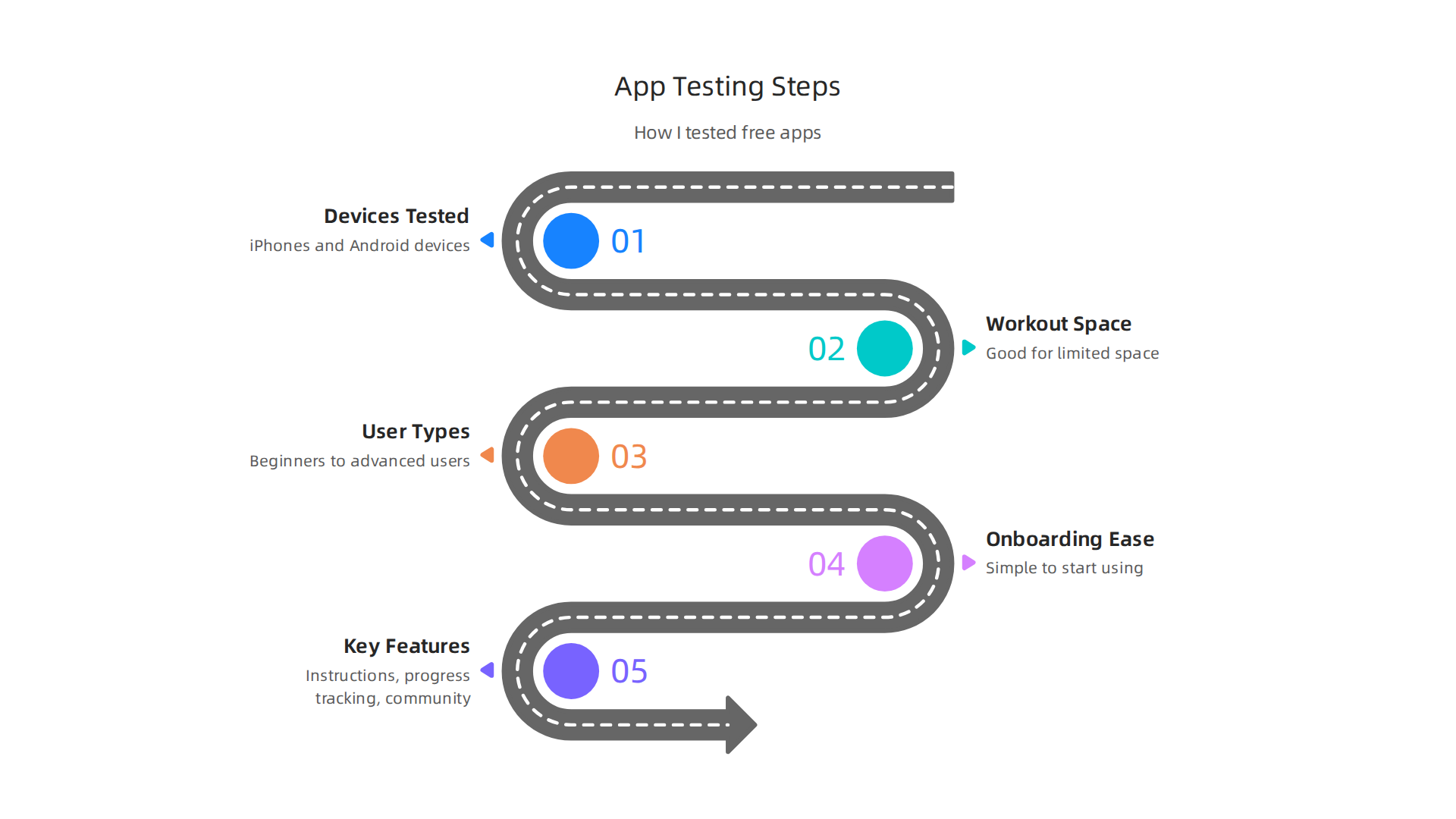
I made sure to test apps on different kinds of phones and tablets, such as iPhones and Android devices. This helps to see if the apps work well for everyone, no matter what kind of tech they have. I also thought about where people work out. Some folks have a big living room, while others have only a tiny corner. So, I checked if the apps were good for people with limited space. And if you don’t have a lot of internet data, some apps can be frustrating, so I looked into that too. It’s really important to test apps on real devices for the best results, as explained in the Mobile App Testing: The Complete Guide (2026).
I tried out different user types. For example, some apps are great for someone just starting out, a total beginner. Other apps are better for someone who has worked out a lot and needs more challenging moves. I played around with apps to see how easy they were to start using. Did they ask too many questions at first? Was it simple to find a workout? This is called "onboarding," and it’s super important for a good user experience.
I also had a list of things I looked for in each app. Does it have clear instructions? Can you track your progress? Does it help you feel like you’re part of a community? I wanted to make sure these apps didn’t feel like useless websites that just sit there without helping you. I spent time doing workouts, seeing how they flowed, and if they really helped with self-improvement and building self-control. Usability testing is key to see if an app is friendly and easy to use for everyone Mobile Usability Testing in 2026.
The main goal was to find apps that truly help you reach your goals, not just ones that look pretty. It was all about finding those special apps that make you want to keep moving and feel great about your progress.
If you’re into learning how different apps can help you, like with photo editing, you might find this interesting: Master The Snapseed Photo Editor App With Essential Tools And Creative Tips.
Ready to take what you learn here and put it into action? We’re always looking for people to join our fun projects and community challenges. Join An Experiment.
When looking at different apps, especially for a [free home workout app review], it’s not enough to just use them. We need a clear way to see which ones are truly the best fitness apps for your self-improvement journey. That’s why I looked at each app through a special lens, checking for things that really matter to you.
Here are the main things I looked for in each free home workout app:
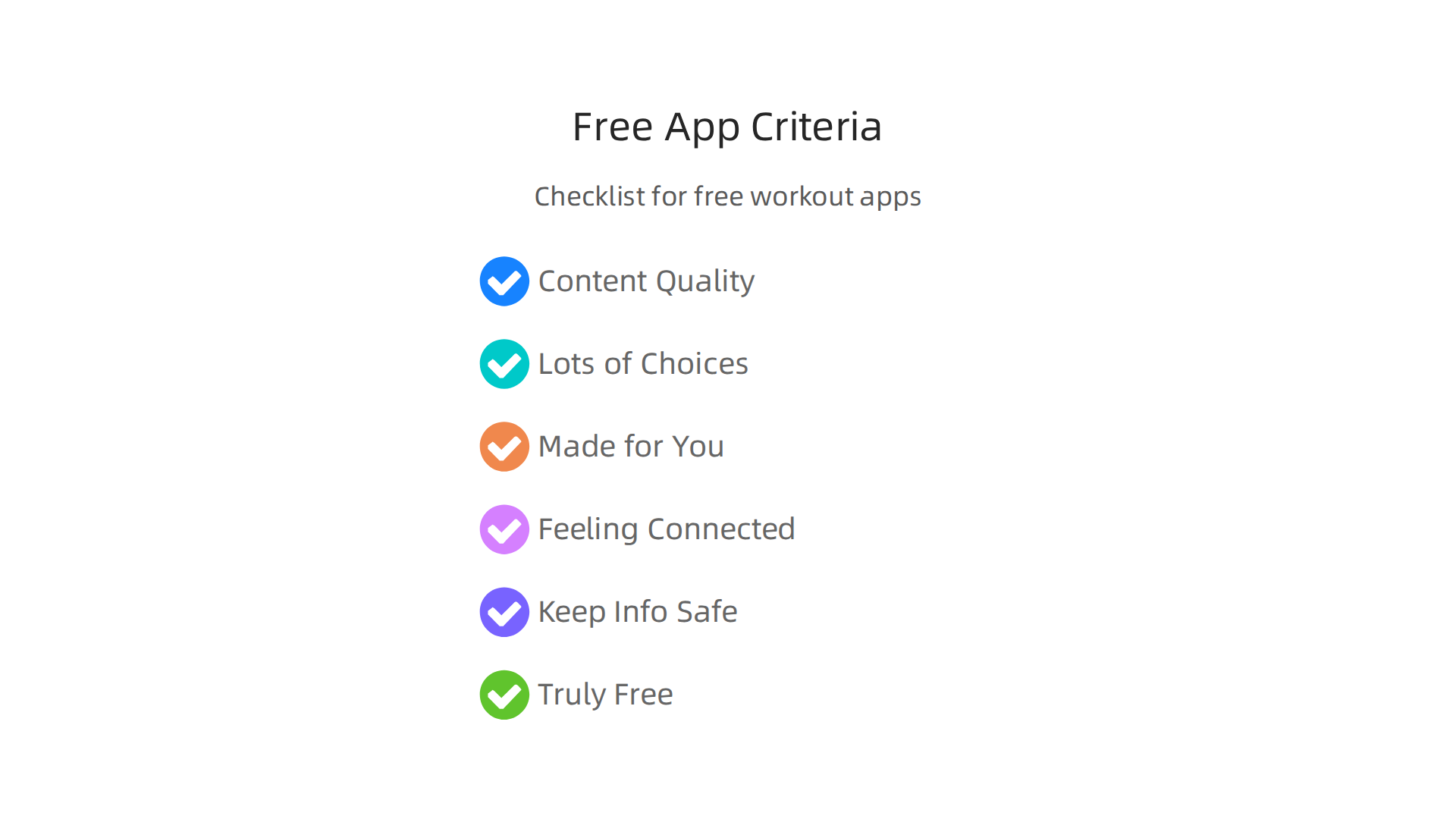
- Good Content Quality: Are the workout videos clear and easy to follow? Do the instructions make sense? We don’t want confusing steps that make you give up. Good content means you get real help and proper guidance.
- Lots of Choices: Does the app have many different workouts? Can you find easy workouts for beginners and harder ones for when you get stronger? Variety keeps things exciting and helps you stick with your goals.
- Made for You: Can you change the workouts to fit your needs? Maybe you have a bad knee or want to focus on your arms. A good app lets you personalize your experience, so it doesn’t feel like a one-size-fits-all solution.
- Feeling Connected: Do you feel like you’re part of a group? Some apps have features where you can cheer on friends or share your progress. This sense of community can really help you stay motivated, turning a lonely workout into a shared adventure.
- Keeping Your Info Safe: How does the app handle your personal details? This is super important. We want to know our information is private and not shared without our say. When checking apps, it’s key to look at what’s called "risk by feature list" to see where potential problems might be, as noted in a Mobile App Testing: The Complete 2026 Guide and Checklist.
- Truly Free or Not: While these are free apps, some try to make you pay for the best parts. I looked closely at how much you could really do without spending any money. We don’t want apps that feel like useless websites unless you pay up.
Beyond these main points, I also thought about how easy the apps were to start using. Did they ask too many questions when you first opened them? This is "onboarding friction," and it can make you want to quit before you even start. I also checked if the apps helped you build good habits and keep going. A really good self control app makes it easier to keep coming back every day. Some apps even help with social engagement, letting you connect with others, which can be a big boost. Thinking about how an app helps users stick with it is part of figuring out its long-term value, as highlighted by experts discussing Mobile App Testing Explained: Best Practices for Success.
Finding apps that help you manage your time and stay focused is also a part of self-improvement. If you’re looking for more ways to stay on track, consider exploring the [best task management apps 2026 for focus and productivity].
After looking closely at many options using my special checklist, it’s time to see which apps truly stand out in this growing market. It’s an exciting time for fitness apps, with the home workout app market valued at over $14 billion in 2025, and it keeps growing fast, expected to reach over $33 billion by 2033, showing just how many people are looking for helpful tools to get fit at home Home Workout App Market Ecosystem Analysis and Competitive ….
Here’s a quick look at the top free home workout apps I found in my detailed free home workout app review.
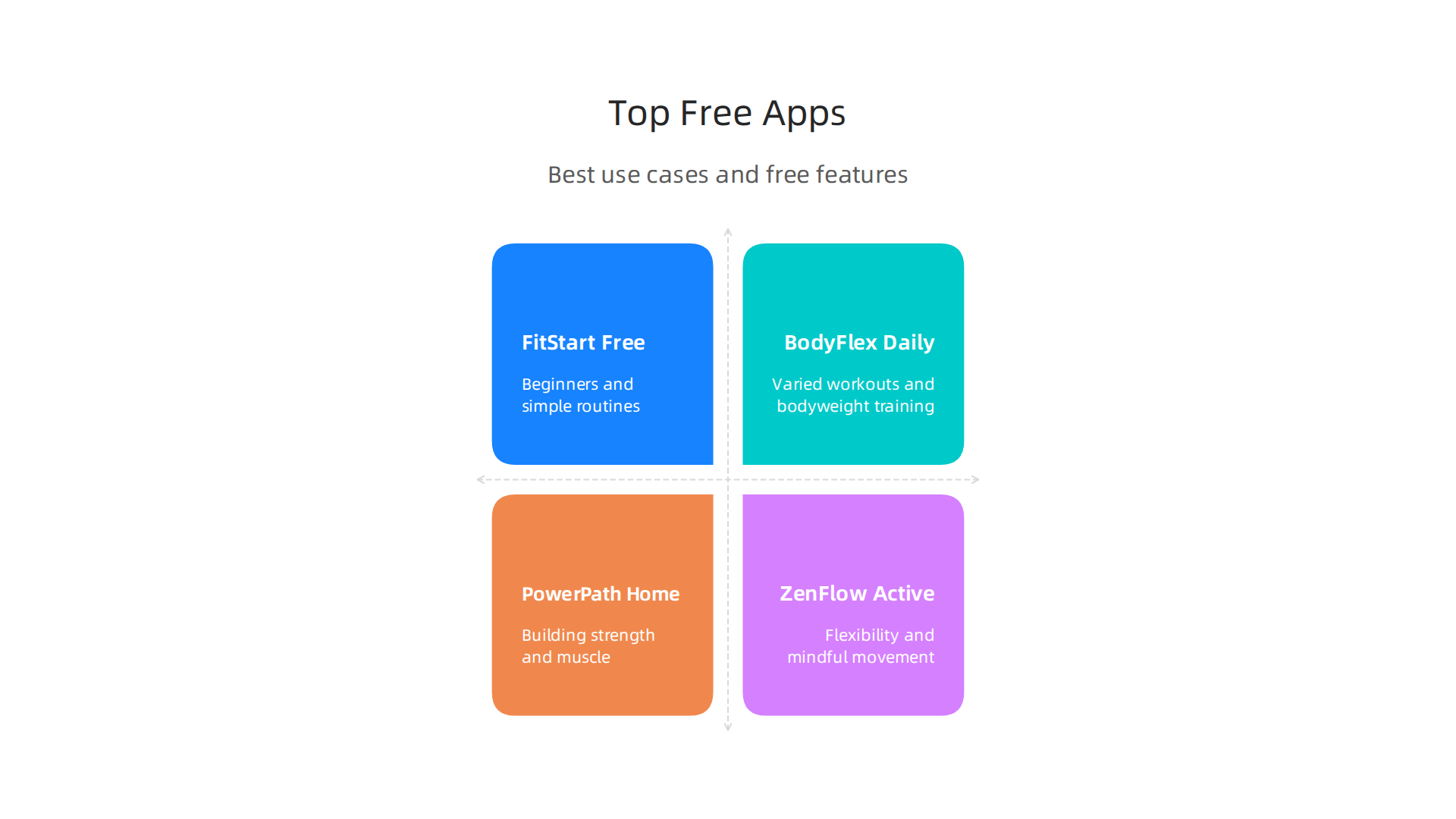
This table will help you see at a glance what each one is best for and what great free features you can enjoy to help with your self-improvement journey.
At-a-glance: Top free home workout apps (summary table)
| App Name | Best For | Key Free Features |
|---|---|---|
| FitStart Free | Beginners and simple routines | Easy-to-follow videos, daily 10-minute workouts, habit tracker, basic progress reports. |
| BodyFlex Daily | Varied workouts and bodyweight training | Many different workout types, challenges, social sharing with friends, quick warm-ups. |
| PowerPath Home | Building strength and muscle | Clear guided workouts, strength-focused plans, no equipment needed, simple goal setting. |
| ZenFlow Active | Flexibility and mindful movement | Yoga, stretching, guided meditation, calming music, routines for better sleep. |
These apps are some of the best fitness apps because they offer a lot without asking you to pay. They show that you don’t need fancy, expensive tools to start your fitness journey. Many free apps still give you a lot, as over 70% of fitness apps are free, with many offering a good experience even without paying for premium features Fitness App Revenue and Usage Statistics (2026).
Keep in mind that this table gives you a quick idea. For more details on each app’s pros and cons, and to help you pick the best one for your needs, make sure to read the full reviews below. They will dive deeper into how each app can truly be a self control app for your workouts, helping you avoid those useless websites and get real results.
Ready to start your fitness journey and connect with a community that supports your goals?
Detailed hands-on reviews: what to expect
Now, let’s dive deeper into each of the free home workout apps. The table gave you a quick overview, but there’s more to know to help you pick the right one for your own self-improvement journey. In this part of the free home workout app review, we’ll look closely at what makes each of these apps special, or not so special, in their free versions.
For each app, we will cover a few important points:
- Getting Started: We’ll see how easy it is to sign up and begin your first workout. Is it quick and simple, or does it ask for too much info?
- Workout Quality (Free Stuff): We’ll check how good the actual free workouts are. Are the videos clear? Are the instructions easy to follow? Do the exercises really feel like they’re helping you get fit? A good workout experience is key for these best fitness apps.
- Making Progress: We’ll look at how the app helps you get better over time. Does it offer new challenges, or keep track of how strong you’re getting?
- Connecting with Others: Some people like to share their fitness journey or get support from friends. We’ll explore if the app has any community features, as many users enjoy connecting with others through their fitness apps Health and Fitness Apps – Toluna.
- What’s Free (And What’s Not): We’ll clearly show you what you can do without paying a dime, and where the app might ask you to upgrade for more features.
As you read these mini-reviews, think about what you want most from a home workout app. Are you just starting out? Do you want to build strength, or maybe get more flexible? Keeping your goals in mind will help you find the perfect self control app to keep you moving and away from those useless websites.
Ready to take action and explore new ways to connect and achieve your goals? Join An Experiment
App review: FitStart — best for beginners
Now, let’s talk about FitStart, which we think is great for anyone just beginning their fitness journey. This part of our free home workout app review will show you what to expect.
- Getting Started: Opening FitStart is really simple. You just put in your name and email. Then, it asks a few easy questions about your fitness level, like "Are you new to working out?" or "Do you want to get stronger?" It uses this to set you up. It’s a quick start, which is nice for a self-control app if you want to jump right in and avoid getting stuck on useless websites.
- Workout Quality (Free Stuff): FitStart’s free workouts are perfect for beginners. They have clear video guides for each exercise. A friendly voice tells you exactly what to do and when. The exercises are basic, like squats without weights or simple stretches, so you don’t need any special gear. These simple, easy-to-follow workouts are designed to help you build good habits without feeling overwhelmed. Many fitness apps offer free services, often supported by ads or options to pay for more features later, making them accessible to many users looking for a free home workout app review Fitness App Revenue and Usage Statistics (2026).
- Making Progress: FitStart helps you get better slowly but surely. It keeps a simple record of the workouts you finish. After a few days, it might suggest trying a slightly harder version of an exercise you’ve mastered. This gentle push helps with self-improvement, making you feel good about what you’ve achieved. The app doesn’t have super detailed charts in its free version, but it does enough to keep you motivated.
- Connecting with Others: In the free version, FitStart focuses on your personal journey. It doesn’t have a big community where you can talk to other users. This means it’s mostly about what you do yourself, which can be great if you like to keep your workouts private.
- What’s Free (And What’s Not): The main daily workouts for beginners are completely free. You get access to a good number of guided videos and basic tracking. If you want more advanced workout plans, special coaches, or super detailed stats about your progress, that’s when FitStart will ask you to pay for its premium version.
Pros of FitStart:
- It’s super easy for new users to understand.
- The video instructions are clear and simple.
- It helps you build workout habits without making things too hard.
- You don’t need any fancy equipment.
Cons of FitStart:
- If you’re already very fit, the free workouts might be too easy for you.
- The free options don’t have a lot of variety, so you might get bored after a while.
- There’s no community support in the free version.
Overall, FitStart is a solid choice for a free home workout app if you’re just starting out and want a simple way to build a routine for self-improvement. It’s like many other helpful online tools that guide you toward your goals, such as The Best Website Tools For Creators In 2026 help creators.
App review: QuickBlast — best for short HIIT sessions
Next up in our free home workout app review, we have QuickBlast. This app is a top pick if you’re someone who doesn’t have a lot of time but still wants to get a good workout in.

It’s especially good for High-Intensity Interval Training, or HIIT, which means quick bursts of hard work followed by short rests. These types of workouts are very popular for people with busy schedules, often lasting only 15-30 minutes, which is perfect for fitting into a workday, as seen in the broader Home Workout App Market.
- Workout Variety and Length: QuickBlast really shines with its focus on short, intense workouts. You won’t find long, hour-long sessions here. Instead, it offers many routines that can be done in 10, 15, or 20 minutes. This is great for those who want a quick boost of self-improvement without spending a lot of time away from other tasks or getting lost on useless websites. The variety comes from different types of HIIT workouts, targeting different body parts, even if the session length stays short.
- Timer and Interval Support: This app is designed to keep you moving. It has a clear timer that tells you when to work hard and when to rest. You don’t need to watch the clock or guess. A friendly voice guides you through each interval, helping you keep your self-control and push through the tougher parts. The videos are easy to follow, showing you how to do each quick exercise correctly.
- Fitting Busy Schedules: If you have a packed day, QuickBlast can be one of the best fitness apps for you. Its short sessions mean you can squeeze in a workout before work, during a lunch break, or even after the kids are asleep. It helps you stay active even when life feels extra busy. This makes it a great self-control app for managing your time and health.
- What’s Free (And What’s Not): QuickBlast offers a good number of free HIIT workouts. You can access many guided sessions with clear timers and instructions. For more advanced programs, personalized plans, or to remove ads, you’d need to upgrade to the paid version.
Pros of QuickBlast:
- Perfect for very short, intense workouts.
- Great for people with busy schedules.
- Clear timers and guided intervals keep you on track.
- Helps with self-improvement in short bursts.
Cons of QuickBlast:
- Might be too intense for absolute beginners.
- Less variety if you prefer longer, slower workouts.
- Can feel repetitive if you do the same workouts often.
QuickBlast is an excellent free home workout app if you need quick, effective ways to stay fit. It helps you stay focused and productive with your fitness goals, much like how some people use Best Task Management Apps 2026 for Focus and Productivity for daily tasks. If you are enjoying learning about tools that help with personal goals and well-being, you might want to learn more about how to stay connected and get more updates.
Want to learn more about new experiments, challenges, and ways to participate in a creative community? Join The Newsletter.
App review: ZenFlow — best for guided yoga and mobility
While QuickBlast is great for high-energy workouts, sometimes you need something calmer for your body and mind. That’s where ZenFlow comes in. This free home workout app review shows it’s one of the best fitness apps if you want to improve how flexible you are and move your body better.
It’s all about gentle movements, proper breathing, and finding your inner calm.
- Class Quality and Teachers: ZenFlow offers many different yoga and mobility classes. The teachers speak clearly and tell you exactly what to do with your body. This is called "cueing," and it’s super important in yoga to make sure you don’t get hurt and do the poses right. You can find classes for beginners or for people who have been doing yoga for a while. The app has a good number of free sessions you can try to see if you like it. These free sessions still give you great guidance.
- Building Daily Habits: This app is a real self control app when it comes to helping you build daily habits for flexibility and better movement. It offers short, easy-to-follow routines that you can fit into any part of your day, making sure you don’t get stuck just looking at useless websites. Regular practice, even for a few minutes, helps you get more flexible over time. Experts say that the best fitness apps in 2026 help users focus on long-term wellness, not just quick fixes, by supporting their daily routines and progress. Apps that make fitness social and help you keep coming back are key to forming habits.
- Community and Support: ZenFlow also has a community part where you can connect with other people using the app. This can make you feel less lonely and more supported in your daily fitness journey. Sharing your progress and getting tips from others can really help you stick with your goals. If you’re looking for other ways to explore personal growth and discovery, sometimes reading a good book can also help you understand yourself better, much like yoga can. Consider looking into The Book of Disquiet: Unlock Fernando Pessoa’s Guide to Self-Discovery for a different kind of self-improvement.
Pros of ZenFlow:
- Excellent for guided yoga, stretching, and mobility.
- Clear instructions and helpful teachers.
- Good free options to get started.
- Helps build habits for long-term flexibility and self-improvement.
Cons of ZenFlow:
- Not for intense cardio or strength training.
- Some advanced features or special programs may require a paid version.
- Might not appeal to those who prefer fast-paced workouts.
ZenFlow is a fantastic choice if your fitness goal is to become more flexible, calm, and aware of your body. It’s a great example of how a free home workout app can support your wellness journey in 2026.
App review: FitCircle — best social and community features
After looking at apps for focused workouts and calm movements, let’s explore an app that shines at bringing people together. FitCircle is a great example of a [free home workout app review] choice because of its strong social features. This app helps you connect with others, making your fitness journey more fun and engaging. In 2026, the best fitness apps use social tools to help people stick with their goals for longer.
- Group Challenges and Leaderboards: FitCircle makes working out a team effort. You can join group challenges with friends or other users, pushing each other to reach new milestones. Imagine seeing your name on a leaderboard, showing how well you’re doing compared to others. This friendly competition can be a big motivator. Studies show that apps that help users join challenges and share progress are key to building lasting habits, turning a simple tool into a true self control app.
- Social Feeds and Creator Engagement: The app has a social feed where you can share your workouts, celebrate achievements, and cheer on your friends. This helps you feel less alone in your fitness journey. Beyond just users, FitCircle also lets creators, like fitness coaches or wellness experts, host special classes and challenges. This means you can get fresh, inspiring content and feel a part of something bigger. Many users find that connecting with a community helps them stay away from endlessly scrolling through [useless websites].
- Privacy and Free Features: FitCircle understands that privacy is important. You can easily set who sees your progress and workouts, so you’re always in control of what you share. When it comes to the free version, FitCircle offers many social features without needing a paid plan. You can join public groups, participate in challenges, and share your basic activities for free. This makes it easy to get started and feel the benefits of a supportive community right away.
Pros of FitCircle:
- Excellent for motivation through social interaction and challenges.
- Easy to connect with friends and other fitness fans.
- Good free options for community features.
- Helps build strong habits through group support.
Cons of FitCircle:
- Less focus on detailed personal coaching in the free version.
- Some advanced group programs or direct creator access might be part of paid plans.
- Might not be for those who prefer to exercise completely alone.
FitCircle is a smart choice if you thrive on social support and enjoy sharing your fitness journey with others. It’s a prime example of how connecting with people can make health goals easier to achieve in 2026. For those eager to dive into shared experiences and collaborative endeavors, you can also Join An Experiment to find new ways to connect and achieve.
Staying connected and getting updates on all sorts of creative and wellness-focused projects can also help keep you motivated. Join The Newsletter to discover more about exciting experiments, challenges, and creator opportunities.
App review: (App E) — best personalization and adaptive plans
While connecting with others makes fitness fun, some apps focus on making your workout plan completely unique to you. App E is a strong contender for a [free home workout app review] because of its excellent personalization and adaptive plans. In 2026, top fitness apps understand that everyone’s body and goals are different, so they offer programs that change with you.
How App E Makes Plans Just for You:
- Smart Assessments: When you start with App E, it asks you important questions about your fitness level, what kind of exercises you like, and your goals. This first talk helps the app learn about you. It’s like having a mini health check-up to make sure the plans fit you well. Apps today use smart tools to give you experiences that are just for you, not just general advice Must-Have Features for Health & Wellness Apps in 2026.
- Workouts That Change With You: App E doesn’t give you the same plan every day. If you find a workout too easy or too hard, the app learns and changes the next one. This means your workouts are always just right, pushing you enough without making you feel overwhelmed. This kind of "adaptive" plan is great for steady [self improvement] because it keeps you challenged. Many users say that apps with AI-powered personal plans are among the Top 5 Health and Fitness Apps to Watch in 2026.
- Personalization in the Free Version: One of the best things about App E is that it offers many of these smart, personalized features even in its free version. You can get tailored workout suggestions and adapted plans without paying. This makes it a great choice if you’re looking for a powerful [free home workout app review] without a big cost.
- Clear About Your Data: App E is also very open about how it uses your information. It tells you how your answers and workout data help it create better plans for you. This trust is important, especially when an app is trying to be your personal fitness guide.
Pros of App E:
- Provides highly personal workout plans.
- Plans adapt as you get stronger or change your goals.
- Many personalization features are free to use.
- Helps you stay on track for long-term health.
- Clear about how it uses your information.
Cons of App E:
- Might feel less social than apps focused on community.
- Some very advanced coaching or special features may require a paid upgrade.
- Needs you to be honest in your self-assessments for the best results.
If you like a fitness journey that feels made just for you, and you want smart plans that adapt to your progress, App E could be the perfect tool. It really helps you focus on your own path to health and develop a kind of [self control app] usage that makes your time count. To manage your daily tasks and focus on your goals, you might also find these suggestions helpful: Best Task Management Apps 2026 for Focus and Productivity.
App review: (App F) — best for creators and small brands
While App E helps you make a workout plan just for yourself, some other [best fitness apps] are made for people who want to share their fitness journey or build a business. App F is a great choice for fitness creators and small brands looking for a [free home workout app review] that helps them connect with others. In 2026, many apps are helping people turn their passion into something more.
How App F Helps Creators and Brands:
- Easy Content Sharing: App F makes it simple for fitness experts to upload their workout videos, tips, and challenges. It’s like having your own fitness channel inside the app. This means creators can easily share what they know with a bigger audience.
- Building a Community: This app lets creators talk directly with their followers. They can answer questions, cheer people on, and create groups for special challenges. This helps build a strong community around their brand. Making new friends and connections is a big part of why people stay active on digital fitness apps in 2026, especially with good social features The 2026 digital fitness ecosystem report.
- Partnership Chances: App F also has ways for creators to team up with others, like small brands that sell fitness gear or healthy snacks. This opens doors for exciting partnerships that can help both sides grow without needing lots of money upfront.
- Free Features for Growth: Many of the best tools for creators, like making and sharing content or building a basic community, are free on App F. This means new creators or small brands can start making an impact without having to pay right away. It’s a truly useful option if you’re looking for a [free home workout app review] that also supports your business goals.
- Easy to Get Found: The app is set up so new people can easily find creators and brands that fit what they’re looking for. This helps creators get noticed and grow their following over time.
Pros of App F:
- Great tools for fitness content creators.
- Helps build a loyal community.
- Offers chances for brand partnerships.
- Many important features are free.
- Easy for users to find new creators.
Cons of App F:
- More advanced features or bigger brand tools might cost money.
- It takes time and effort to build a community.
- You might need good equipment to make quality videos.
If you’re a fitness enthusiast who wants to share your knowledge, or a small brand looking to connect with a health-minded audience, App F could be a powerful platform for you. For other tools that can help you with your creative endeavors, you might also be interested in exploring The Best Website Tools for Creators in 2026.
To stay up-to-date with new content, creative opportunities, and community challenges, we invite you to Join The Newsletter.
Personalization, progression, and building habits with free tools
While some apps help fitness creators share their work, many other [best fitness apps] are all about helping you get better. Even free versions can give you tools to personalize your fitness journey, make progress, and build good habits that stick. In 2026, finding a great [free home workout app review] often means looking at these helpful features.
How Free Apps Help You Grow:
- Knowing Your Starting Point: Many free fitness apps begin by asking you simple questions. They might ask about your fitness level or what you want to achieve. This helps the app suggest workouts that are right for you. It’s like having a little coach tell you where to begin.
- Workouts That Change With You: As you get stronger, the best free apps can make your workouts a bit harder. This is called adaptive design. It means the app changes to match your progress, so you keep getting challenged without getting bored. Research shows that apps are getting better at giving people personalized and adaptive workouts to help them stay active 2026 Mobile Fitness Apps in Promoting Habit Formation.
- Gentle Nudges and Reminders: It’s easy to forget to work out. That’s why many apps have reminders. They send you a little message to help you remember your workout or when it’s time to stretch. These small nudges can make a big difference in sticking to your plans.
- The Power of Streaks and Small Wins: Have you ever seen an app that celebrates when you work out several days in a row? That’s a "streak." Many apps use games or rewards, also known as gamification, to make you feel good about continuing your efforts. This helps build healthy habits. Studies show that streak systems are used by most top apps in 2026 to keep people engaged Habit Tracking App Market Size & Trend. When you see your streak growing, it gives you a tiny win that makes you want to keep going. This idea of celebrating small wins early on is key to stopping people from giving up on apps Why Most Fitness Apps Lose 80% of Users in 30 Days.
- Building Strong Habits: Free apps can help you create a routine for your [self improvement]. They offer tools like goal setting and tracking your progress. This kind of "habit architecture" helps you see how far you’ve come and what’s next. It gives you a sense of [self control app] over your fitness journey. If you’re looking for more ways to stay organized and focused, you might find some useful ideas in the Best Task Management Apps 2026 for Focus and Productivity.
These features show that even free apps can be powerful tools for personal growth and staying fit. They help turn intentions into actions and make good habits easier to keep.
If you’re ready to move beyond just scrolling and start actively building a new habit or skill, we invite you to Join An Experiment.
Community, social features, and safety
While getting stronger by yourself is great, many free fitness apps also help you connect with other people. This can make working out more fun and help you stick with it. When you look at a [free home workout app review], thinking about its community features is a smart idea.
Connecting with Others in Apps:
- Group Workouts and Challenges: Some apps let you join groups with friends or other users. You can do challenges together, which is like having a team. This shared goal can push you to do more. For instance, in 2026, many digital fitness reports show that features like activity feeds and leaderboards help keep users engaged The 2026 digital fitness ecosystem report.
- Talk with Trainers and Creators: Many of the [best fitness apps] allow you to follow fitness creators. Sometimes, you can even chat with them or other users. This makes your fitness journey feel less lonely and more like you are part of something bigger.
- Leaderboards and Friendly Competition: Seeing your name on a leaderboard can be a fun way to stay motivated. It’s a friendly contest that makes you want to keep improving your fitness. This kind of social interaction can really help with long-term engagement.
Keeping Your Information Safe:
It’s important to remember that when you share things online, you need to think about privacy. Good apps will tell you how they use your data and what information is shared with others. Look for apps that let you control your privacy settings. This way, you can decide how much you want to share with the community or with the app makers. Making sure your information is safe helps you feel secure while you enjoy the social benefits of the app.
Staying connected through apps can turn your solo workouts into a shared adventure. If you want to keep up with more ways to turn fun into action and connection, we invite you to Join The Newsletter.
How to choose the right free app for your goals
Now that you know what to look for in a free fitness app, how do you pick the very best one for you? It’s like finding the perfect pair of shoes for a long walk. You need them to fit just right for your unique journey. When you read a [free home workout app review], remember these simple steps to make a good choice.
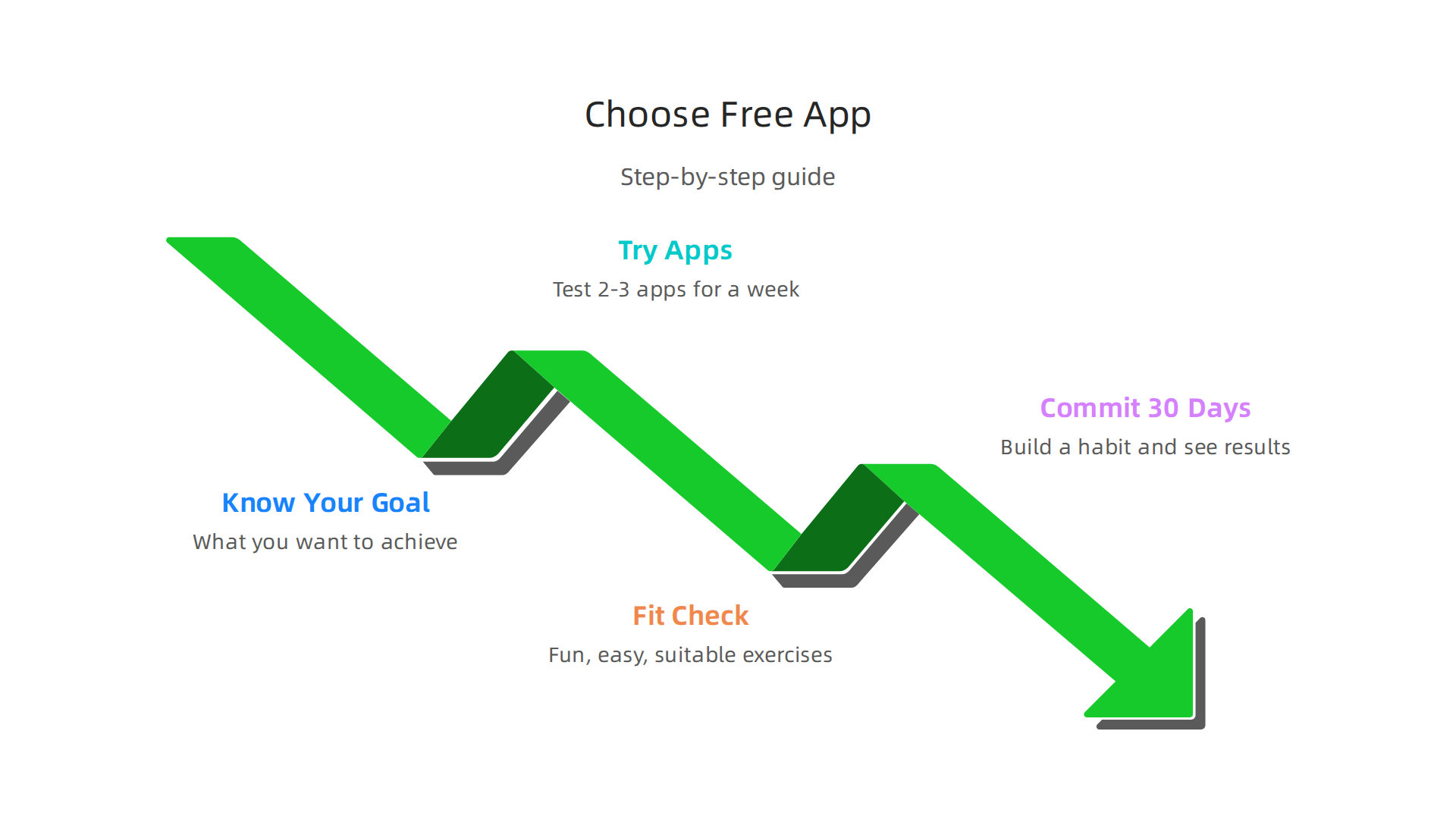
Your Easy Steps to Pick an App:
- Know Your Goal: First, think about what you want to achieve. Do you want to feel stronger, move more easily, or just feel better overall? Knowing this helps you look for apps that offer the right kind of help.
- Try a Few Apps: Don’t pick the first one you see. Try out 2 to 3 different [best fitness apps] for about a week each. Think of it as a test drive. Does it feel good to use? Is it easy to understand? This hands-on testing is like what experts do to check if apps are user-friendly Mobile App UI Testing: Best Practices in 2026.
- Check How It Fits: After trying them, ask yourself:
- Are the workouts fun and easy to follow?
- Does it have the kind of exercises you like?
- Do you like its community features, if it has any?
- Do you feel your information is safe with this app?
- Commit for 30 Days: Once you find an app that feels like a good fit, promise yourself to use it for 30 days. This helps you build a habit and see real results. This kind of sticking with a plan is great for [self improvement]. If you are working on staying focused with your tasks, you might also find a [self control app] helpful.
Here are some quick tips for different kinds of people:
| Who You Are | What to Look For |
|---|---|
| Student | Quick workouts (10-20 min), needs no fancy equipment, quiet moves. |
| Busy Professional | Short, effective workouts, scheduling tools, progress tracking. |
| Creative Thinker | Apps with unique programs, varied moves, good music options. |
| Just Starting Out | Clear guides, easy moves, beginner plans, good explanations. |
Choosing the right app can really help you stay on track with your fitness goals. It’s a simple step that can lead to big changes. Ready to take action and try something new?
Join An Experiment to find new ways to engage and grow. Just as a good app can help you focus, other tools like best task management apps 2026 for focus and productivity can help you manage your time and stay productive in all parts of your life.
Summary
This article is a hands-on review of free home workout apps that helps you cut through the noise and pick tools that actually move you toward your goals. It explains why the fitness-app market has exploded, how I tested apps on real phones and tablets, and which criteria matter most—clear instruction, variety, personalization, social features, privacy, and what’s genuinely free. You’ll find short profiles of top free apps for beginners, HIIT, yoga, community engagement, personalization, and creators, plus a quick comparison table to match apps to real needs. The piece also shows how to test apps yourself, what onboarding and habit features to watch for, and simple steps to try an app for 30 days. After reading, you’ll know how to evaluate free fitness apps, which apps fit common goals, and how to avoid tools that look good but don’t help you improve.